If you’ve ever visited a construction site, a warehouse restocking high storage racks, or an industrial maintenance shop fixing overhead machinery, chances are you’ve seen a double mast aluminum alloy lift at work. As a supplier who’s spent years selling, installing, and troubleshooting these units for clients across multiple industries, one of the most common questions I get from first-time buyers is: “What’s actually on the control panel?” It’s a fair question—after all, this small, often overlooked panel is the brain of the lift, and getting to know its layout and functions is key to operating the unit safely and efficiently. Double Mast Aluminum Alloy Lift
Let me start by setting a quick context: double mast aluminum alloy lifts are designed for working at heights ranging from 20 to 50 feet (6 to 15 meters), with load capacities usually between 300 to 500 kg. Unlike scissor lifts, their two vertical aluminum masts give them better stability and a smaller footprint, making them ideal for tight indoor spaces. But their compact size also means their control panels need to be intuitive, not overcrowded, so operators can focus on the task at hand instead of fumbling with confusing buttons.
Over the years, I’ve seen countless lift models come and go, but the core control panel layout for double mast aluminum alloy lifts has remained largely consistent—for good reason. It’s built with safety as the top priority, followed by ease of use. I’m going to break this down step by step, starting with the most critical part of the panel: the main control interface.
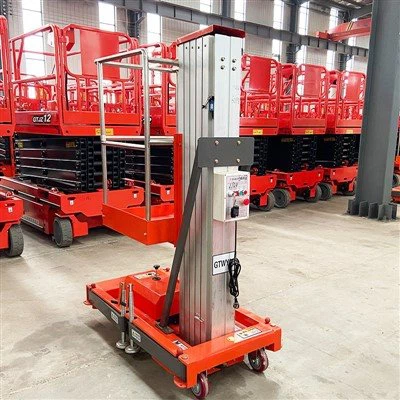
Most double mast aluminum alloy lifts have two control stations, by the way: one on the platform (upper control station) and one at the base of the lift (lower control station). This design is non-negotiable for many of our clients, like warehouse managers who need to position the lift from the ground while a worker is high up retrieving inventory. The layout of these two stations is almost identical, with a few small variations based on manufacturer, but I’ll focus on the standard design we use for most of our units, which is widely recognized across the industry.
First, let’s talk about the lower control station. This is the station I recommend new operators use for pre-operation checks, because it gives you a full view of the entire lift and its surroundings. When you look at the lower control panel, the first thing you’ll notice is the main power switch. It’s a large, red, circular switch, usually marked with “ON/OFF” text, and it’s spring-loaded to cut power immediately if you pull it back. This is a safety feature designed to stop the lift in an emergency. Next to the power switch is the key ignition. Unlike car keys, this key only needs to be turned halfway to activate the control panel, not all the way to start an engine—since these lifts are electric, there’s no engine to start. We make sure this key is not accessible to the general public; only trained operators get a copy, to prevent unauthorized use.
Below the power and ignition, you’ll find the directional controls for moving the lift’s base. Wait, yes—double mast lifts aren’t just for going up and down. Most models have wheels that can be locked or moved short distances, which is perfect for repositioning without having to lower the platform every time. The directional control here is a simple, two-position toggle switch: push it forward to move the lift toward you, pull it back to move it away. It’s spring-loaded, so if you let go, it pops back to neutral, which prevents accidental movement. There’s also a speed control lever here, usually a small sliding switch marked “HIGH” and “LOW.” I always advise clients to use LOW speed when moving the lift—high speed is only for leveling on even, flat ground, and it’s not allowed when the platform has workers or a load on it. That’s a rule that’s saved a lot of us from accidents over the years.
Now, the most important part of the lower panel, and honestly the heart of the whole unit: the vertical lift controls. These are two large, rubberized push buttons, colored green (for “UP”) and red (for “DOWN”), located right next to the directional controls. They’re recessed slightly so they don’t get bumped accidentally by tools or parts in the control station, and they only work when the safety arm is engaged. Wait, right—most lower control stations have a large, extendable safety arm that you have to lock in place before you can operate the lift. That’s another built-in safety feature. If the safety arm isn’t locked, the UP and DOWN buttons won’t do anything, no matter how hard you press them. That’s not a flaw—it’s there to stop operators from moving the lift before they’re ready, or if they’re not standing in a stable position at the base.
Moving up to the upper control station, which is on the platform itself, the layout is almost identical, but there are a few key differences. First, the power switch and ignition are usually the same, but there’s an additional override button here. This is for when an operator on the platform needs to take control if the lower station’s controls fail. I always train operators to only use this override if the lower station is completely unresponsive—using both stations at the same time is a big no-no, it can cause the lift to glitch or even tip. The vertical controls on the upper station are the same green UP and red DOWN buttons, recessed for safety, and again, they won’t work if the lift’s overload sensor is triggered.
Speaking of sensors, that’s a big part of the control panel that operators might not see, but that’s embedded in the panel’s wiring: the overload protection sensor. It’s a small, square light on the control panel, usually yellow, marked “OVERLOAD.” If the platform has more weight than the lift is rated for, that light flashes, and the UP button stops working entirely. You can still move the platform down to get to a safe level, but you can’t go up until you remove the excess weight. I’ve had clients try to cram 500 kg of boxes into a lift rated for 400 kg, and that light saving them from a disaster is the reason we emphasize that sensor so much. It’s not just a suggestion—it’s a built-in safety measure that comes with every double mast aluminum alloy lift we sell.
Then there are the auxiliary controls, which vary a bit depending on the unit’s features. For example, many of our lifts have a platform tilt lock, which is important if you’re working on uneven ground. That control is a small toggle switch marked “TILT LOCK,” usually on the edge of the control panel, so it’s easy to reach but not accidental. There’s also a horn button, a small speaker icon, for signaling workers on the ground when you’re moving the platform, and a emergency stop button—another large red circular button, usually on both control stations, that cuts all power to the lift immediately. If there’s any hazard, if someone is in the path of the lift, or if the lift starts to tip, hitting that stop button is the first thing to do.
Over the years, we’ve made small adjustments to the control panel layout based on feedback from operators. A few years back, we started putting all the warning lights in a clear, linear sequence at the top of the panel, instead of scattered around, so operators can glance up and immediately see if something’s wrong. Before that, some operators missed a low battery light because it was tucked next to the directional controls, leading to dead lifts in the middle of a job. Now, lights like low battery, overheat, and mast alignment error are all at the top, easy to spot. That’s the thing about double mast aluminum alloy lifts—their control panels aren’t just designed in a lab; they’re refined based on real-world use, because our clients rely on these lifts to keep their operations running.
I want to address a common misconception here: some people think because these lifts are compact, their control panels are basic. That couldn’t be further from the truth. The control panel is a balance of simplicity for new operators and enough features for experienced ones. We sell units to small contracting companies with one operator, and to large logistics firms with dozens, so the layout has to work for everyone. For a new operator, the key switches and lift controls are obvious—no confusing menus, no touchscreens that can glitch if they’re dirty. For experienced operators, there are hidden settings, like adjusting the speed of the lift’s ascent or tweaking the sensor sensitivity, that we can unlock during training, based on the specific job. For example, when a client is working on fragile materials, we can lower the lift’s ascent speed slightly to reduce jostling.
One of the most important parts of the control panel that I see new clients miss is the operator’s manual pocket, usually attached to the back or side of the control station. I always make sure every lift we sells has a clear, printed manual that walks through every control, every light, and every safety feature. You don’t have to be an engineer to use these lifts, but taking the time to sit down and go over the control panel with your team is non-negotiable. I’ve seen too many accidents happen because an operator thought a button did one thing, but it did another. For example, the directional toggle on the lower control isn’t for moving the lift left and right—that’s a common mistake. It’s only for forward and backward movement, and left/right repositioning is done with wheel locks, a separate control on the base. That’s the kind of detail we drill into operators during our free training, which we offer for every unit we sell.
Now, if you’re in the market for a double mast aluminum alloy lift, I can’t stress enough how important it is to work with a supplier who understands the control panel layout, not just the sales numbers. A lot of cheap imports cut corners on safety features in the control panel—they skip the overload sensor, they use thin plastic buttons that break easily, they don’t have clear warning lights. We’ve had clients come to us after buying a lift online that died mid-job because the control panel’s wiring was faulty, and they had to pay twice to replace it. Our lifts use heavy-duty rubber buttons, industrial-grade wiring, and all the safety controls I’ve talked about, because we know that the control panel is what keeps your workers safe and your operations on schedule.
If you’re not sure what kind of layout works for your needs—whether you’re working in a tight warehouse, a construction site, or a facility with low ceilings—we can help. We’ll send a representative to your job site to show you exactly how the control panel works, let your team test the controls, and answer any questions you have. We also offer customized modifications to the control panel for specific jobs. For example, a client who works in cold storage (temperatures below 0°C) asked for buttons that are larger and easier to press with gloves, so we adjusted the design to accommodate that. That’s the kind of flexibility you don’t get with generic lift models.
At the end of the day, the control panel of a double mast aluminum alloy lift is more than just a set of buttons and switches. It’s the interface between your team and the lift that keeps them working at height. It’s built for safety, designed for ease of use, and refined over years of working with clients across industries. If you’re ready to learn more about our double mast aluminum alloy lifts and their control panel layouts, or if you have questions about customization, maintenance, or pricing, we’re here to help. Reach out to our team to set up a consultation, and we’ll walk you through every detail, so you feel confident in the lift you choose for your operations.
Articulated Boom Lift References:
- Occupational Safety and Health Administration (OSHA). “Powered Platforms for Construction: Double Mast Aluminum Alloy Lift Safety Standards.” OSHA 29 CFR 1926 Subpart L, 2022.
- International Organization for Standardization (ISO). “Lifts for Work at Heights: Safety Requirements Verification.” ISO 16368:2020.
- Aluminum Association. “Design and Performance Guidelines for Compact Mast Lifts.” Aluminum Vehicle Technology Council, 2021.
- National Safety Council (NSC). “Operator Training and Control Panel Safety for Aerial Work Platforms.” NSC Workplace Safety Report, 2023.
Shandong Zhongke Huali Machinery Co., Ltd.
As one of the most professional double mast aluminum alloy lift manufacturers and suppliers in China, we also support customized service. We warmly welcome you to wholesale discount double mast aluminum alloy lift in stock here from our factory. For price consultation, contact us.
Address: No. 2 Qubai Road, Qudi Street, Jiyang District, Jinan City, Shandong Province
E-mail: hlizhonggong@163.com
WebSite: https://www.hualiheavy.com/
